Posts

Showing posts with the label Zwift

SB20 - Compensating for Power Meter Inaccuracy

Image
Are my Power Meters Accurate? One of the most common complaints on cycling social media is: "My power meters are inaccurate." Reasons include: 1. Riders perform better in different environments. Whether it's outdoor or indoor, many cyclists see higher power in specific scenarios. 2. You’ve done a dual meter comparison using something like ZwiftPower ( Comparing Power Meters with ZwiftPower ). 3. The power meters are actually bad ( opinions vary so please keep reading )   Here's the problem:   Comparisons can be misleading. Indoor and outdoor riding environments differ significantly . The resistance and acceleration vary greatly, causing many power meters to struggle with accuracy in one environment versus the other. Riding style is also a factor; smooth riders often see different average power measurements compared to those who vary their cadence and acceleration. With dual power meter comparisons  it is impossible to know which power meter is correct when only two a...

SB20 Not shown in Zwift

Image
If you use Zwift long enough, you have seen the following: Why does my Bike Disappear from Zwift? The SB20 bike can have at most 2 Bluetooth connections. After this limit is exceeded, the bike is not visible to apps like Zwift. Each Stages power meter crank can have at most 2 Bluetooth connections. After this limit is exceeded, the PMs are not visible to apps like Zwift. Sounds easy to manage, right? Not always . The hidden culprits are apps on your phone. It is common for an app controlling something like a TV or speaker, to connect to the SB20 and PM cranks to see what services they provide. To do this kind of "feature interrogation", one of the two available Bluetooth connections will be used. If the app developer is not careful, that connection can be maintained when you open another app.  Here is an example of a feature I recently implemented in my GearView app This simple page lets you check battery levels of all nearby devices before starting a ride.  One click and ...

SB20 - Zwift Connection Error

Image
December 20, 2025 Update: This bug is still present in Zwift Release 1.104.3 Bug Summary: Stages Bike is not listed as Resistance controller when Stages Power Meter is selected for both Power Source and Cadence . History For almost two four years, the  Stages SB20 bike has had an issue connecting to Zwift.   On seemingly random occasions, the  Stages Bike  is not shown as a  Resistance  option on the Paired Devices page. This bug is easy to reproduce on iOS devices (iPads and iPhones) using Bluetooth.  Stages Bike Resistance Bug Before starting, do some pedalling to wake up the Stages Power Meter cranks .   Open the Paired Devices screen. Click Power Source to continue. Select the  Left Crank  for  Power Source . Select the  Left Crank  for  Cadence . Since Left Crank selected for both Power Source and Cadence ,  Stages Bike is not listed. Note: If Stages Bike is listed ,  exit  and...

Comparing Power Meters with ZwiftPower

Image
In a previous post, I showed how to record data from two power meters and analyze results in a spreadsheet: Comparing Power Meters with a Spreadsheet . Today's post shows how to do power meter comparisons using ZwiftPower - and no spreadsheets 🤓. ZwiftPower Dual Power Meter Analysis Tool The ZwiftPower.com web site has a tool for comparing power meters. It works best with a Zwift activity (race, workout, group ride or whatever) although the method described here lets you compare any FIT activity files from other sites like Rouvy.com or TrainerDay.com .  Note: Comparing power meters is only useful if one or more of the power meters has been calibrated with a torque test . Skip this test and you won't know which power meter is incorrect when differences are found . Comparing SB20 Smart Bike with Garmin Rally Pedals In this example, I use my Stages SB20 smart bike to compare power readings with a set of Garmin Rally pedals.  I do a structured workout where Zwift records pow...

Indoor Riding - ANT+ and Bluetooth

Image
ANT+ and Bluetooth are essential wireless technologies that enable indoor cycling. What do they do? How are they different? Why should you care? Assumptions: In this post, I use the term indoor bike to mean smart bike or trainer .  I own a Stages SB20 Smart Bike and use it in my examples.  Protocols ANT+ and Bluetooth are  protocols  that facilitate the transfer of data between apps and devices. In this context, they are like spoken languages . ANT+ is like  English and Bluetooth  is like  French . Both communicate similar information using different verbs, nouns and ways of speaking. ANT+ was introduced nearly 20 years ago to support monitoring of data from devices like heart rate monitors (HRMs) and bike sensors. Since then it has been extended to control and monitor fitness machines including  indoor bikes . Bluetooth  was introduced around the same time to support things like handsfree phone headsets. It was updated from 201...

SB20 - How to Pick a Zwift Power Source

Image
Real Power Meters The Stages SB20 Smart Bike is unique. It uses two crank-based power meters to send power measurements to apps like Zwift. Most other bikes and trainers guess at power based on how much electronic braking is being applied at any given moment (this method is good when a bike/trainer leaves the factory - not so good as components wear). How to Connect an SB20 Zwift can connect to the Left Crank or the Stages Bike (SB20) itself as a Power Source : Which should you pick? Zwift Connections Here's how crank power meter data (power and cadence) is sent to Zwift, the Stages Cycling app and other devices like a Garmin computer: Bluetooth, ANT+ and WiFi connections are all used.  Here are some additional details: 1. The right crank gets its own data (raw force and cadence information) and sends an update to the left pedal once a second with power and cadence metrics. 2. The left crank collects the right crank data, adds to its own data and sends consolidated informat...

Smart Bikes, Zwift and Bike Computers are all WRONG

Image
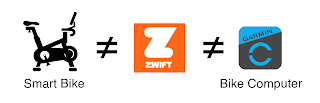
My SB20 smart bike comes with an app that shows power, distance, cadence, L:R balance and current virtual gear. You can also use a bike computer like a Garmin 540/840/1040  to show similar data. When you use either at the same time as  Zwift, you see different numbers.  Who is correct? Answer: They are ALL CORRECT and ALL WRONG!  How can that be?   Let's find out. Before getting started,   it's a good idea to agree on basic parameters. Note: In this discussion, I use the term  Indoor bike  for smart bikes and smart trainers along with their related apps. RESISTANCE AND POWER 1. RESISTANCE - An indoor bike creates resistance that makes it harder or easier to pedal.  2. POWER - The harder you push against the indoor bike's resistance (measured in newton metres) multiplied by how fast you pedal (RPM) defines the POWER you are producing (specified in watts per second or just watts). POWER is a measured number and is EXACTLY the same if ...

ZWIFT PLAY CONTROLLER - Better Fit

Image
IMPROVING THE ZWIFT PLAY CONTROLLER I got a pair of Zwift Play Controllers the other day. I found the fit to be uninspiring . The sharp curve on my smart bike handlebars ( Stages SB20 ) allows for quite a bit of up/down and side-to-side movement. This is inherently a Zwift design issue. The controllers appear to be optimized for deep drop bars rather than my bike's tightly curved and flared gravel bike-style handlebars. EXPERIMENTS I experimented with various DIY foam inserts - including the shims provided by Zwift. None did much to reduce movement. “Mushy” is how I would describe button presses. THE FIX: EPOXY SHIMS I decided to create a rigid epoxy shim to get better contact between the Zwift controller and my smart bike handlebars. Here's what I did... 1. EPOXY PUTTY A shim is moulded using epoxy putty from Home Depot. You knead the putty for a few minutes to activate it. The result is a pliable compound that is workable for about 30 minutes. 2. MOULD TO SHAPE Masking tape i...

STAGES SB20 - DIY "Rocker Plate"

Image
Indoor Bike Rocker Plate on the Cheap Here are the latest updates to my DIY indoor bike "Rocker Plate".  I want side-to-side movement for comfort and especially when do sprints. Commercial product are too big and unwieldy.  They also provide for and aft movement that I don't find particularly helpful. The Stages SB20 bike footprint is essentially the same as before. It rides surprisingly well thanks to dual density foam. A padded centre-line offers support and good dampening. For more details see: Indoor Bike Improvement #10 - SB20 Rocker Plate  

Stages SB20 - Zwift Cockpit

Image
 My Zwift Cockpit (with updates) What's Here? Stages SB20 Smart Bike Left iPad: Stages Cycling App.  Shows virtual gear, L:R pedal balance, 1s Watts and Cadence Right iPad: Zwift app. iPad 9th generation - all that's currently needed for optimum Zwift performance Wireless charger for iPhone with on/off switch . Useful for showing the Zwift companion app in group rides Garmin Computer . Why a Garmin Computer? Zwift automatically records speed, distance, cadence and power. Much of this is based on Zwift's internal physics model that includes calculations for road surfaces, hills and wind resistance. Nice but it doesn't include: L:R balance and pedalling dynamics data. Data that Garmin uses for TSS and IF metrics plus ongoing V02 Max estimates. Warm-up and warm down segments. I do a lot of Zone 2 training.  My warm-up and warm-down is a significant part of my workout. I want to see this data. I use a Garmin computer to record all my workouts, winter and summer. The pow...